Five accidents, one name
“I sent USDT on the wrong chain” is used to describe at least five situations that have nothing operationally in common. Sorting yours into the right box is most of the work:
The five cases
- A. Sent to an address you control, but on a different EVM chain than intended — Ethereum instead of BNB Chain, Polygon instead of Arbitrum. Usually recoverable in full.
- B. Sent to an exchange deposit address with the wrong network selected. Depends on that venue’s process and whether it runs the chain at all.
- C. Crossed the EVM / non-EVM line — a
0xaddress on one side, Tron or Solana on the other. Usually blocked by validation; when it is not, it is usually final. - D. Sent to a token contract, a burn address, or a stranger. Almost never recoverable by you.
- E. Sent to a chain that needs a tag or memo, with the field left blank. Usually recoverable — it is a bookkeeping problem, not a chain problem.
This article is the companion to our stablecoin cross-chain tutorial. That one covers moving stablecoins between chains on purpose — bridges, the burn-and-mint versus lock-and-wrap models, and the exchange route. This one covers what happens when the move went somewhere you did not intend. If you are reading this before making a transfer rather than after, the other page is the one you want.
Why it happens · one ticker, several contracts
USDT is not one token. It is a family of separate tokens on separate ledgers that share a name, a logo and a peg. Each one is a distinct contract with its own address, its own supply and its own holders. Nothing in the token standard connects them. The Ethereum one lives at:
0xdAC17F958D2ee523a2206206994597C13D831ec7
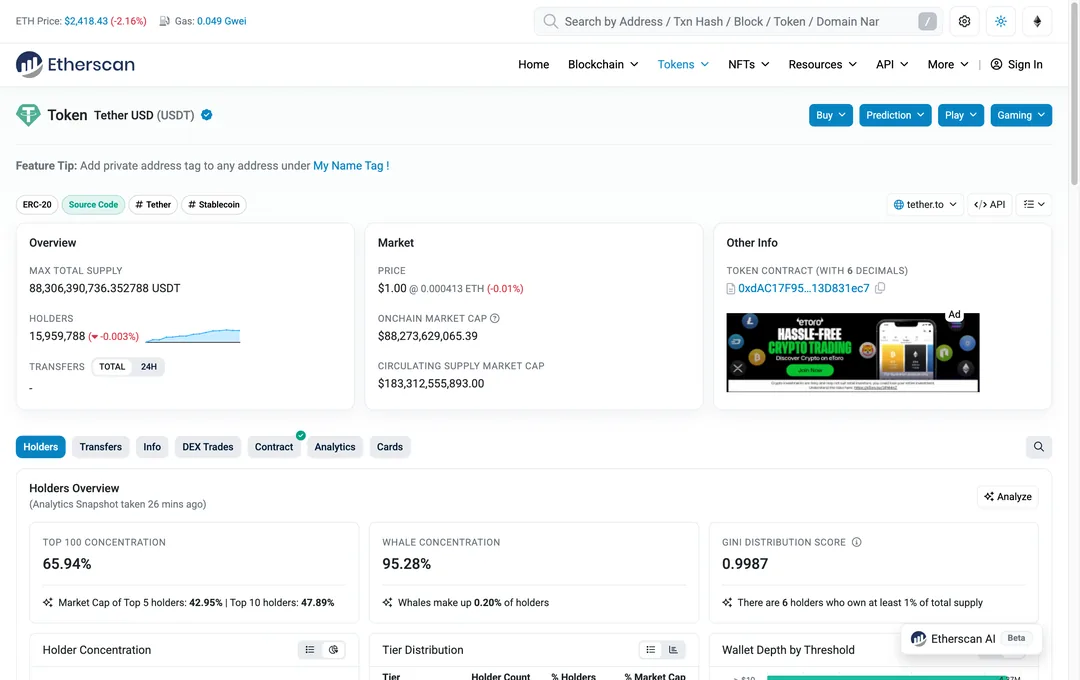
Read those two figures against each other, because the gap is the whole point of this article. The contract’s own supply is about 88.3 billion USDT — that is the Ethereum ledger and nothing else. The circulating-supply market cap line on the same page, which counts every chain Tether issues on, reads about 183.3 billion dollars. The contract in that screenshot holds under half of all USDT in existence. The rest sits on other ledgers, under other contracts, that this page knows nothing about and cannot see.
On BNB Chain it gets stranger. The token everyone there calls USDT sits at 0x55d398326f99059fF775485246999027B3197955, and it is a bridged representation rather than a native Tether issuance — data aggregators file it under the ticker BSC-USD, not USDT (checked against the CoinGecko API, September 2026). On Tron, USDT is TR7NHqjeKQxGTCi8q8ZY4pL8otSzgjLj6t, in an address format with nothing in common with the 0x strings above.
Three different contracts. Three different supplies. One logo in your wallet. The only place in a typical withdrawal form where that difference is visible is a dropdown labelled Network, usually a small control sitting below the address field, often pre-filled with whatever you used last time. That is the design flaw producing the entire category of accident, and no amount of care on the user’s side fully removes it.
Case A · EVM to EVM, into an address you control
This is the most common version and the least dangerous, though it does not feel that way at the time.
The mechanism. An EVM address is derived from your key material — the last 20 bytes of the Keccak hash of the public key. No chain identifier goes into that derivation. Ethereum, BNB Chain, Polygon, Arbitrum, Base, Optimism and Avalanche all use the same scheme, so one seed phrase produces the same 0x address on all of them. Your MetaMask “Account 1” is literally the same address everywhere.
The consequence. Nothing left your control. The tokens are sitting at your address, on a chain your wallet was not displaying. People describe this as losing money; in most cases it is closer to opening the wrong drawer.
What to do, in order:
- Confirm on the explorer for the chain it actually used. Paste the transaction hash and check the receipt status, the token contract, and the recipient in the token-transfer records. For an ERC-20 transfer, the transaction's top-level
Tooften points to the token contract; it is not necessarily the person receiving the tokens. Case A requires the intended token balance to have reached the ordinary address whose key you control. - Add that network to your wallet. In MetaMask, open the network selector and look for the entry that reads “Add network”; Rabby ships most EVM networks already loaded; Trust Wallet has an equivalent under its network list. If you would rather not type RPC details by hand, chainlist.org adds most EVM networks in one action. Wallet layouts change; look for the wording, not a position on screen.
- Add the token by contract address if it does not appear by itself. A zero balance very often means the wallet is showing the wrong contract for that chain, not that the money is gone. Take the contract address from that chain’s own explorer.
- Check how the outgoing transaction will pay its fee. An ordinary wallet-paid transfer on these networks needs native gas: BNB on BNB Chain, POL on Polygon, ETH on Arbitrum or Base. Some supported wallet flows can sponsor the fee or charge an eligible token instead; MetaMask's gas-included transactions are one example, with network, token and settings requirements. Read the current quote before funding gas or signing. No fixed dollar amount is enough in every case. If the key may be compromised, stop: sending gas into that address can feed an automated sweeper.
- Decide whether to move it back at all. If the chain it landed on is cheap and liquid, and your venue accepts deposits there, the cheapest fix is often no fix: use it where it is.
The caveat that cancels this whole case: smart contract wallets. If the destination was a Safe multisig or an account-abstraction wallet, that address is a deployed contract, and contracts are chain-specific. The same address on another chain may hold no code at all, or — in unusual deployment situations — code that is not yours. Safe supports deploying at the same address on other chains in some configurations, but this is neither automatic nor guaranteed. If your destination was a contract wallet, check the destination-chain explorer for whether that address holds code before you count anything as recovered.
Second caveat: the same-address rule is an EVM rule. A multi-coin wallet like Trust Wallet or MetaMask derives different addresses for Bitcoin, Solana and Tron from the same seed. Seeing one seed phrase in one app does not mean one address everywhere.
Case B · Wrong network into an exchange deposit address
Here the private key belongs to the venue. You cannot act on the address; you can only ask, and what you can ask for is defined by their published process rather than by the chain.
Binance runs a self-service recovery flow for deposits that did not arrive, and its help page is worth reading before you write anything, because it states the eligibility conditions plainly rather than burying them.
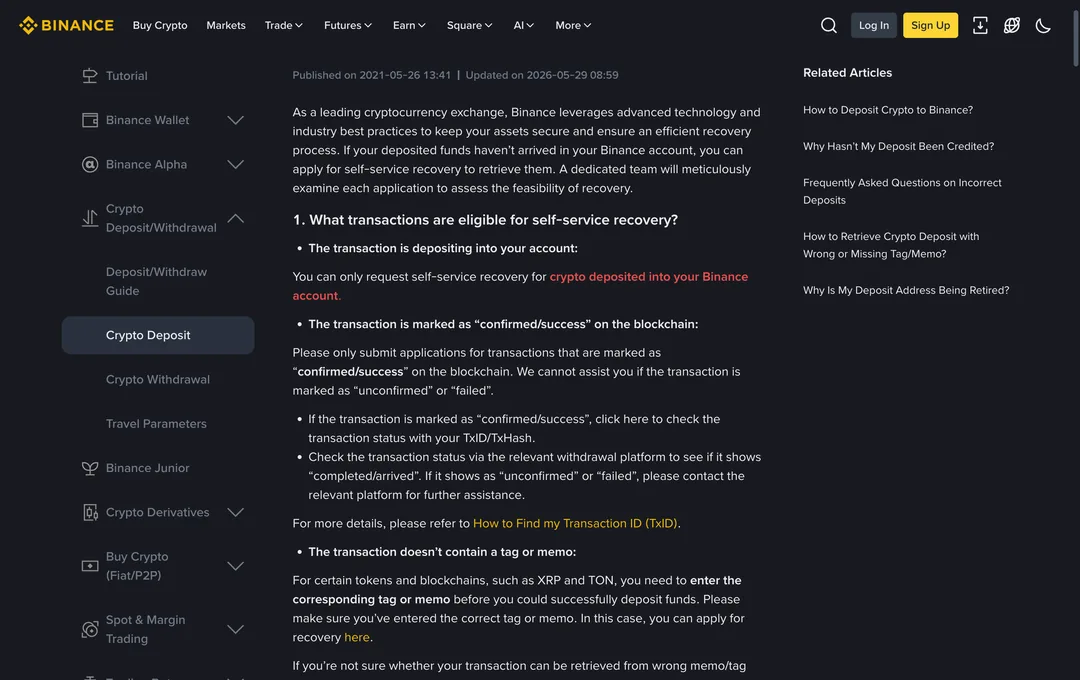
Three conditions, in the venue’s own framing:
- The deposit has to be into your own account. The page limits self-service recovery to crypto deposited into your Binance account. A transfer that landed at somebody else’s deposit address is not something you can file for — the account holder is the only party who can.
- The transaction has to be marked confirmed or success on the blockchain. The page is explicit that they cannot assist where the transaction shows as unconfirmed or failed, and directs you back to the platform that sent it. Check the explorer before you file, not after.
- Missing tag or memo cases are covered for the tokens and chains that use them — the page names XRP and TON as examples.
What the page does not offer is an outcome. It describes a team examining each application to assess the feasibility of recovery. Read that exactly as written: an assessment, with a possible answer of no. A recovery fee may also apply; we are not quoting a figure, because it varies by token and chain and is shown inside the flow. Read the number the flow gives you before you submit, not after.
Have these ready before you start: the transaction hash, the network the transaction actually used rather than the one you meant, the destination address, the token, the amount and the timestamp. Screenshot the explorer page yourself; help-page contents and form fields change, and a capture with a date on it is worth more later than a memory.
Other venues set their own recovery criteria. An unsupported deposit network does not prove that the venue lacks the relevant key: ordinary EVM addresses can correspond to the same key across networks. Its custody system may nevertheless lack a supported recovery procedure, and a smart-contract deposit address can have different deployment or control arrangements on each chain. Ask the receiving venue to assess the exact address, token and network. Technical control, operational support and permission to perform a recovery are separate questions.
One thing worth doing regardless: if the receiving venue is a large one, check whether it credits the deposit automatically before you file anything. Detection and crediting for common chains can happen without any ticket, and filing on top of an automatic credit just adds a case number to close.
Case C · Across the EVM / non-EVM line
Format validation catches most of these before they happen, which is why they are rarer than the forums suggest. An Ethereum transaction cannot even be constructed with a T-prefixed Tron address in the destination field — the base58 string is not a valid EVM address, and wallets reject it at the input box. The classic “I sent ERC-20 USDT to a Tron address” story usually dies at the send screen.
The version that does get through is different: a withdrawal screen where several networks are offered, all destinations are format-valid, and the wrong one is selected. Withdrawing on Ethereum to a recipient who only monitors BNB Chain. Withdrawing TRC-20 to a venue that lists Tron for other assets but not for the one you sent.
There is one narrow technical exception, and it is worth stating precisely rather than as folklore. Tron addresses are derived from the same secp256k1 key material as EVM addresses — the same 20 bytes, wrapped in a different encoding — so a private key that controls an Ethereum address also controls the corresponding Tron address, and Tron wallets accept a raw private-key import. That helps only if the tokens landed at exactly that corresponding address, which is not the situation most people are in. Solana uses a different curve entirely (Ed25519); no equivalent trick exists there, and anyone offering you one is selling something.
The practical answer for this case is the same as everywhere else: work out who operates the destination address, and go through them. If the answer is nobody, you are in Case D.
Case D · Contracts, burn addresses and strangers
These destinations require different checks. A valid address does not establish that anyone can or will return the tokens.
Token contracts. A surprisingly common accident is sending USDT to the USDT contract address itself, usually by copying the contract address from an explorer page instead of a wallet address. The contract holds the balance and has no obligation to give it back. Some token contracts include a rescue function that a privileged operator can call; many do not, and you are in no position to plan around one existing. Treat this as unrecoverable until proven otherwise.
Burn and null addresses. Addresses such as 0x0000000000000000000000000000000000000000 and 0x000000000000000000000000000000000000dEaD have no known controlling private key. Searching for a usable key is not a practical recovery route. The token contract may reject such a transfer, implement burning, or record a balance at the destination; inspect the actual transaction. Any issuer intervention is a separate, discretionary process, not recovery of a lost private key.
A mixed-case EIP-55 checksum can help detect typing errors when the application validates it. Lowercase addresses are also accepted by many applications, so do not count on every typo being rejected. A substituted but valid address can pass format checks: clipboard malware and address poisoning exploit exactly that gap. Compare the complete destination against a trusted source, rather than copying an address from an unsolicited transaction in your history.
A stranger’s address. If another person controls the address, there is no wallet button that reverses the transfer. Preserve the transaction record and contact an identifiable recipient through a verified channel. Suspected theft or fraud can also be reported to the relevant authorities; any legal remedy depends on the case and jurisdiction. Do not publish sensitive details or trust unsolicited recovery offers, and never disclose a seed phrase to someone claiming to help.
Tether has a published recovery-request process. Its token recoveries page, checked September 12, 2026, describes discretionary assessment of certain mistaken deposits. Eligibility, verification, fees and the destination's recoverability matter; success and a completion time are not guaranteed. It advises contacting the receiving party first. Theft, hacks and law-enforcement matters use a separate information-request process. The old version of this guide incorrectly said no individual request route existed.
Case E · Missing tag or memo
On chains that use a destination tag or memo, the address identifies the venue and the memo identifies you inside it. Thousands of customers share one deposit address; the memo is the only thing separating them. Omit it and your deposit lands in the venue’s pooled address with no label attached.
The help page names XRP and TON as examples of deposits that may require an identifier. A memo or tag is often a receiving platform's accounting requirement rather than a universal requirement for every transfer on that chain. Ordinary USDT transfers to your own Ethereum or Tron address typically do not need one, but a custodial deposit must follow that venue's instructions for the exact token and network. A sender's optional field does not override a receiver's required field.
If the venue received the supported token at an address it controls, the task may be to identify and credit the customer. That gives support a concrete issue to investigate, but not an obligation or guaranteed timetable to credit it. Use its missing-tag procedure if one is provided, and supply the transaction hash and account details through official support. Incorrect identifiers can require additional checks, especially if another account was already credited.
If the venue does not support the token on that network, follow Case B. Control of the address is only one requirement: its custody system must also permit an operation that can return or credit those tokens.
The judgement table
Find your row, and act on the last column only. The middle column is the reason the last column says what it says.
| Situation | Who can act at the destination | Realistic outcome | First move |
|---|---|---|---|
| EVM to EVM, into your own wallet address | You | Accessible if the same key controls the address and the token permits transfer | Verify the network and token contract, then check the gas needed to move it |
| EVM to EVM, but your address is a Safe or other contract wallet | The contract’s authorised signers, if a compatible deployment exists or can be made | Uncertain — verify before assuming either way | Check on the destination-chain explorer whether that address holds code |
| Wrong network into your own exchange deposit address | The exchange | Depends on venue policy and whether it runs that chain | Check for an automatic credit first, then open the venue’s recovery flow with the hash |
| Wrong network into someone else’s exchange deposit address | That exchange, for the account holder | Not your process to run | Send the recipient the hash and ask them to file it |
| Across the EVM / non-EVM line, to an address nobody you know runs | Unknown; address encoding alone does not establish control | Cannot be assessed without identifying the destination | Identify who operates the address on the explorer before spending effort |
| Sent to a token contract or a burn address | A contract operator may have a rescue function; burn addresses have no known key holder | No normal sender-controlled return; any contract or issuer remedy is conditional | Preserve the hash and consult verified contract documentation or the issuer’s published recovery policy |
| Sent to a stranger’s address | The stranger | No unilateral reversal; recipient cooperation or an applicable legal process may be needed | Use a verified contact if one exists; report suspected fraud through the appropriate authority |
| Missing tag or memo, venue does support that chain | The venue | The venue must identify the deposit and assess whether it can credit or return it | Use the official missing-tag procedure if provided, otherwise contact official support |
The first ten minutes
- Stop. No further transactions from the sending account until you know where the first one went.
- Get the transaction hash from the wallet activity list or the venue’s withdrawal history.
- Open the explorer for the chain the transaction actually used. Confirm the status is success and read the destination address off the page rather than off your memory of what you pasted.
- Answer the key question. Who controls that address? Your wallet, a venue, a contract, or an unknown party. Explorers label many known addresses, which resolves this in seconds more often than people expect.
- Screenshot everything now — explorer page, withdrawal record, the network you selected. Support flows ask for these, and pages change.
- Only then act, on the row of the table you are in.
Not getting here again
Every item below costs less than the cheapest version of the accident.
- Test transfer, every time the destination is new. Send a small amount, confirm it arrives and is credited, then send the rest. The fee on a test transfer is the cheapest insurance in this entire field. The habit only works if you actually wait for the credit rather than firing both transactions back to back.
- Use the address book or withdrawal whitelist. Saving an address with a label that includes the network — “Kraken deposit, Arbitrum”, not “Kraken” — moves the network choice from something you re-decide under time pressure to something you decided once, calmly.
- Read the network name, not the logo. ERC-20, BEP-20, TRC-20, Arbitrum One, Base, Polygon. The authority on which of these is acceptable is the receiving side’s deposit page, not the list your sending wallet happens to offer. Open both screens and compare the words.
- Check both screens in the same minute. Most wrong-network transfers involve an address copied at one time and a network selected at another, with an interruption in between.
- Check how transaction fees will be paid. An ordinary self-custody transfer generally needs the network’s native token; a sponsored transaction may work differently. Verify the fee estimate before funding the address, especially if its key may be compromised.
- Use the internal transfer when both sides are at the same venue. It never touches a chain, so there is no network to select incorrectly and no explorer to check afterwards.
Sources
Contract addresses and figures read on 2026-09-02. Everything in this section is a snapshot with a date attached; supply figures move continuously, and help-page contents change without notice.
- Etherscan, Tether USD (USDT) token page — ERC-20 contract 0xdAC17F958D2ee523a2206206994597C13D831ec7; max total supply 88,306,390,736.352788 USDT; 15,959,788 holders; onchain market cap 88.27 billion USD against a circulating-supply market cap of 183.31 billion USD. etherscan.io
- Binance help centre, “How to Retrieve a Deposit That Hasn’t Arrived With Self-Service Recovery?” — eligibility conditions for self-service recovery; page header read “Updated on 2026-05-29” on the day of capture. binance.com/en/support
- CoinGecko API asset records — Tether platform contract on Ethereum and on Tron (TR7NHqjeKQxGTCi8q8ZY4pL8otSzgjLj6t); Binance Bridged USDT on BNB Smart Chain listed under the ticker BSC-USD at 0x55d398326f99059fF775485246999027B3197955. coingecko.com
- Chainlist, EVM network parameters used for the add-network step. chainlist.org
Further reading on this site
- Stablecoin cross-chain tutorial — the paired piece: how to move between chains deliberately, and which route to pick.
- Tainted USDT and frozen accounts — the other way a transfer goes wrong, where the tokens arrive but the account does not survive it.
- How to cash out stablecoins — the off-ramp, where a wrong network selection is most expensive.
- 20 Questions New Stablecoin Holders Often Ask — if the vocabulary in this piece was the hard part.
- What a stablecoin actually is — the ten-minute version, including why the same ticker exists on several chains.
- Glossary — EVM, ERC-20, memo, calldata, burn address, checksum.